
You open the terminal, brief Claude on a client, and get good work. The next morning, it remembers nothing. You re-explain the brand voice, the scope, the open issues. Again.
That re-explaining is a tax. It costs you the first 30 minutes of every session, and it scales with every client you add. You are the integration layer, manually carrying context between your tools and your own head. That is a pipeline job, and it should not be yours.
Claude Code fixes this by treating plain markdown files as persistent memory it can read, write, and connect. This guide gives you an agency-specific framework for building that system. By the end, you will know how to structure a vault for multiple clients, automate real deliverables, and keep client data safe.
What a Claude Code Second Brain Actually Is (and Isn’t)
A Claude Code second brain is a knowledge system where client and project information lives as plain text files that an AI agent reads, writes, and maintains directly. It keeps persistent memory across sessions, so your agency stops re-explaining context every time you sit down.
The distinction matters. A chatbot answers questions about your work. This system does the work on the files themselves. It navigates folders, runs searches, and writes notes back into the right place. Knowledge management stops being storage and becomes an active loop.
The idea is not new. Tiago Forte popularized the second brain as digital memory that extends your mind. Andrej Karpathy sharpened it for the AI era with his LLM Wiki approach. Claude Code is what makes it run inside your actual workflow.
Why Plain Markdown Beats a Vector Database
You do not need a vector database or RAG to build this. Your notes stay as plain text files that Claude Code reads directly, so there is no embedding step and no retrieval system to maintain.
This is the counterintuitive part. Removing infrastructure makes the system more capable for an agency, not less. There is no export step, no vendor lock-in, and no proprietary database that strands your data if a tool shuts down. The agent reads and edits the files the same way you would.
Markdown is portable, composable, and native to how the model reads. Tags, frontmatter, and wikilinks are all just text. That keeps the whole knowledge management layer under your control.
The Four-Layer Architecture for Agency Work
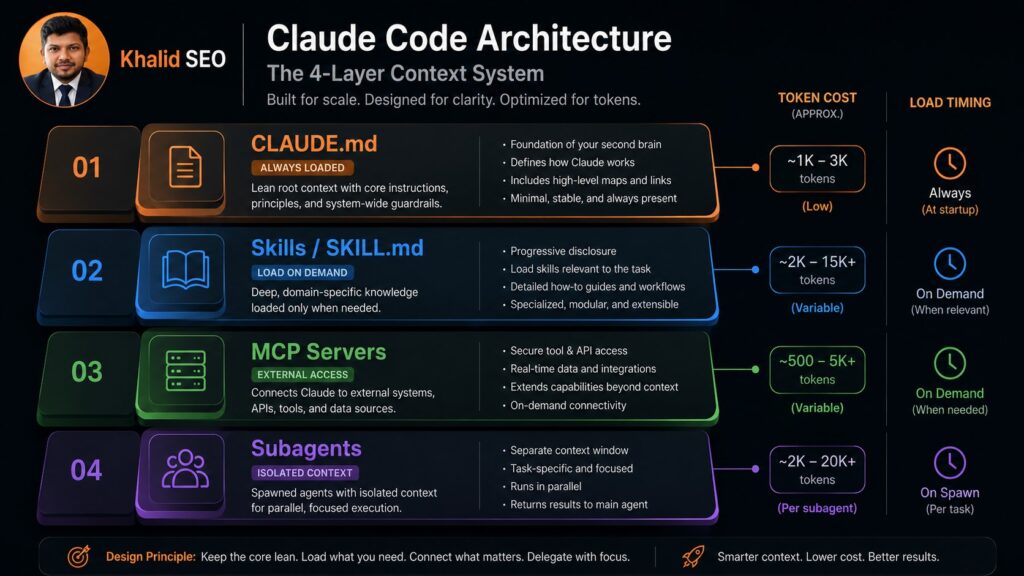
A working agency setup has four layers: CLAUDE.md for always-loaded context, Skills for reusable workflows that load on demand, MCP servers for access to external systems, and Subagents for heavy work in an isolated context.
Each layer has one job. They differ in when they load and what they cost you in tokens. Get the division right and the system stays fast and cheap. Get it wrong and you bloat every session.
This is the part most personal-use guides skip. They show a vault and a single context file. An agency juggling clients needs all four layers, mapped to real workflows.
CLAUDE.md, Your Always-Loaded Root Context
CLAUDE.md is the file that runs on every session. It loads automatically, before anything else, so it sets the baseline for how Claude understands the project.
Keep it lean. It belongs to client identity, brand voice, project scope, current status, and standing rules. Those are the things Claude needs every single time. The token budget is real, and this file spends it on every turn.
What does not belong: credentials, API keys, and bulk reference material. Those go into Skills or separate files you load only when needed. A bloated CLAUDE.md is slow and expensive, and it buries the rules that matter.
Skills, Reusable Workflows That Load on Demand
Skills are reusable workflows defined in a SKILL.md file with YAML frontmatter. They sit dormant until a task matches their description, then load only the instructions that task needs. This is progressive disclosure.
The economics are the point. A skill costs roughly 30 to 50 tokens until it is invoked. That is why the smart pattern is many skills and few servers. You can encode your exact proposal format or audit structure once and reuse it forever.
Think of a skill as encoded agency preference. It teaches Claude your way of doing a thing it already broadly knows how to do.
MCP Servers, Connecting to the Tools You Already Run
MCP servers give Claude Code access to external systems it cannot reach on its own. One server per system: GitHub, Linear, Slack, your project tracker. They handle tool calling so the vault is not an island.
More servers is worse, not better. A five-server MCP setup can cost 50,000 or more tokens upfront, before you have done any work. That overhead loads whether or not you use those tools in a given session.
So pin one server per system you genuinely depend on. Then stop. Resist the urge to connect everything, because token overhead compounds across every session you run.
Subagents, Isolated Context for Heavy Lifting
Subagents run a task in their own separate context window. A deep audit or a long research job runs there, not in your main session.
The payoff is output quality. Heavy work fills a context window fast, and a full window degrades reasoning. By delegating to a subagent, your main session stays lean and focused on the decision you actually care about. The subagent chews through the volume and reports back.
How to Set Up Your Agency Second Brain Step by Step
Five steps:
1) Install Claude Code.
2) Create a vault folder with one subfolder per client.
3) Write a lean CLAUDE.md for project rules.
4) Add two or three Skills for your most repeated deliverables.
5) Connect only the MCP servers you actually need.
That order is deliberate. Most setups stall after two weeks, and the cause is almost always overbuilding. People wire up seven MCP servers and a 4,000-word context file before they have done a single piece of real work.
Start small enough to use it tomorrow. One vault, a lean root context, a couple of skills. Add layers only when a real task demands them. The system should earn its complexity.
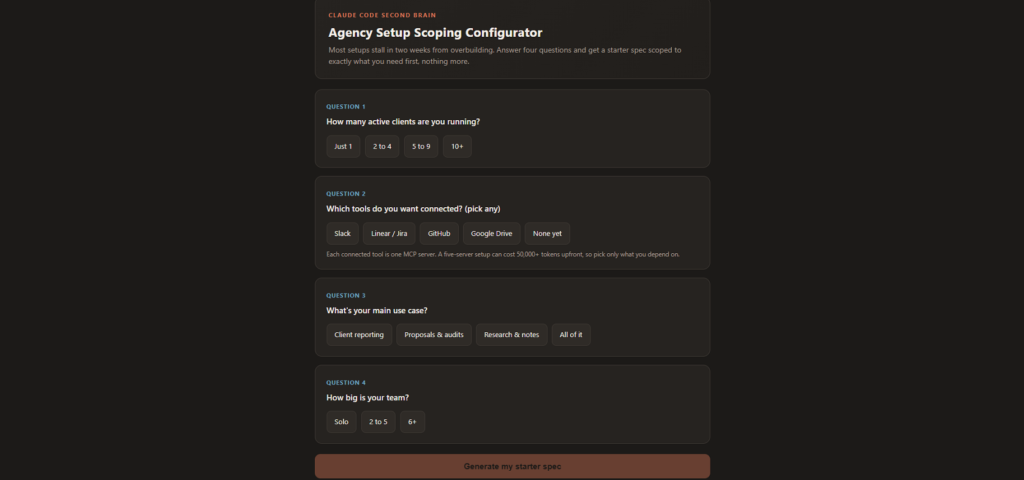
👉 Agency Setup Scoping Configurator
Structuring Your Vault for Multiple Clients
Give every client its own folder and its own CLAUDE.md. That single move keeps brand voice, scope, and status from bleeding across accounts.
This is the biggest gap in personal-use guides. A solo developer needs one context file. An agency running five clients needs five, each scoped to one relationship. When Claude works inside a client folder, it loads that client’s rules and nothing else.
The structure stays plain markdown, so there is no vendor lock-in. You can move it, back it up, or hand it off. The client context lives in folders, exactly where you would expect it.
| Dimension | CLAUDE.md | Skills (SKILL.md) | What to Do With It |
|---|---|---|---|
| When it loads | Every session, automatically | Only when a task matches | Put always-needed rules in CLAUDE.md; put task-specific procedures in Skills |
| Token cost | Spent on every turn | ~30-50 tokens until invoked | Keep CLAUDE.md lean; write many skills freely |
| Best for | Client identity, voice, scope, status | Repeatable deliverables like proposals and audits | Identity in the file, workflows in the skills |
| Risk if misused | Bloat slows and costs every session | Too few means you repeat yourself | Audit CLAUDE.md size; encode anything you do twice |
Putting It to Work, Real Agency Workflows
This system produces billable output, not just tidy notes. The clearest example is the weekly review, where Claude reads a week of daily notes and writes a coherent client report.
Point it at your daily notes and ask for a summary of decisions, open tasks, and project activity. It stitches the week into one picture. That output doubles as client reporting and as a record for your own performance reviews.
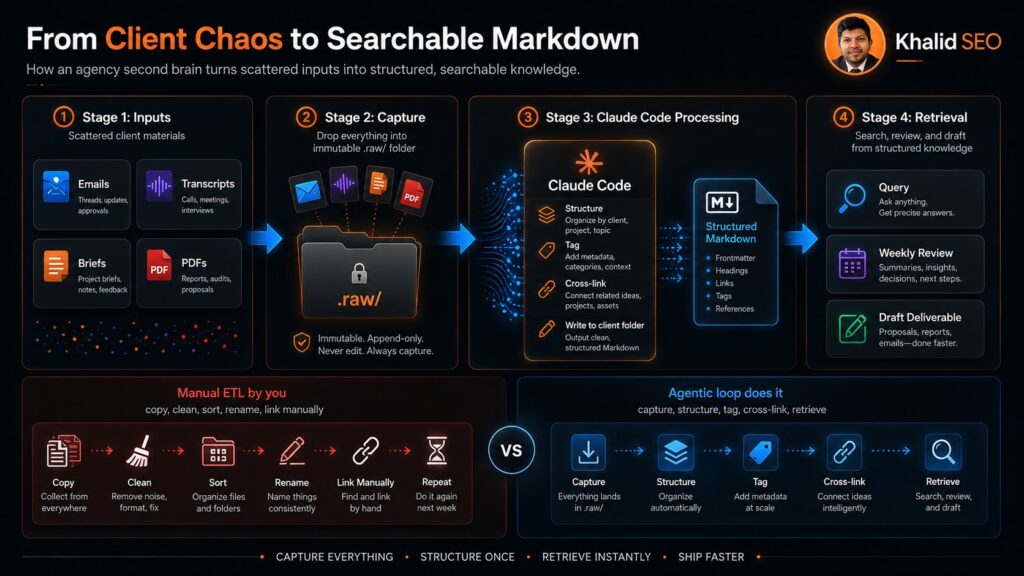
The agentic loop is what makes this work. Claude reads the files, reasons over the context it has built, and writes the result back into the vault. Knowledge management becomes something the system does, not something you do.
Automating Proposals, Audits, and Reporting
Tie one skill to one deliverable. A proposal skill writes proposals in your format. An audit skill runs audits in your structure. Same input shape, same output, every time.
This is where SKILL.md as encoded preference pays off. You are not asking the model to “help you write.” You are handing it your firm’s exact reusable workflow and getting consistent deliverables back. The variance that makes outsourced drafting risky disappears.
Write the skill once, off your best past example. Then every future proposal starts from your proven structure.
Keeping Client Data Safe
It can be safe, with discipline. Keep raw sources in an immutable folder, never store credentials in CLAUDE.md, read every SKILL.md before you install it, and review an MCP server’s permissions before connecting it to client data.
No personal-use guide covers this, and for an agency it is the part that protects the client relationship. You are putting other people’s confidential information into a system that reads your shell and your files. That demands a process.
Treat skills like dependencies, not passive content. A skill you did not read is code you did not review running against your client data. Read the SKILL.md end to end, and check what tools it requests.
What to Never Put in CLAUDE.md
Credentials, API keys, and bulk confidential reference material stay out of CLAUDE.md. Full stop.
There are two reasons. The first is confidentiality: this file is the most-loaded, most-copied piece of your setup, and secrets there spread everywhere. The second is the token budget, because CLAUDE.md loads on every session and bulk reference material burns tokens on every turn for no benefit. Keep secrets in your environment and reference material in load-on-demand files.
Frequently Asked Questions
What is a Claude Code second brain?
A Claude Code second brain is a system where client and project information lives as plain markdown files that Claude Code reads, writes, and connects directly, keeping persistent memory across sessions so you stop re-explaining context.
Unlike a chatbot that only answers questions, this system maintains the knowledge base itself. It navigates folders, runs searches, and writes notes back into place. For an agency, that means client context survives between sessions instead of resetting every morning. The concept traces back to Tiago Forte’s second brain and Andrej Karpathy’s LLM Wiki, adapted to run inside your real workflow.
How do I set up Claude Code as a second brain for my agency?
Five steps: install Claude Code, create a vault folder with one subfolder per client, write a lean CLAUDE.md for project rules, add two or three Skills for repeated deliverables, then connect only the MCP servers you actually need.
The order protects you from the most common failure. Most setups stall within two weeks because people overbuild before doing real work. Start with one vault and a lean context file. Add a per-client CLAUDE.md as you onboard each account. Only wire up an MCP server when a specific task needs that external system, since each one carries real token overhead.
Is Claude Code better than Notion for agency knowledge management?
They solve different problems. Notion stores and displays your notes. Claude Code reads, reasons over, and maintains them. The difference is that Claude Code actively writes your knowledge base using plain markdown, with no vendor lock-in.
Notion is a strong home for documents a human reads. Claude Code is an agent that edits the knowledge base as it works. The two can coexist, but for the specific job of keeping client context alive across sessions, the file-native approach wins. Plain markdown also means no export step and no risk of stranded data if a tool changes its terms.
Do I need a vector database or RAG to build this?
No. This approach skips vector databases and RAG entirely. Your notes stay as plain markdown files that Claude Code reads directly, so there is no embedding step, no retrieval system, and no extra infrastructure to maintain.
This surprises people who assume AI knowledge systems require heavy machinery. The opposite holds here. Because the agent reads files natively, removing the retrieval layer makes the system simpler and more capable at once. Andrej Karpathy’s LLM Wiki popularized this file-direct approach as an alternative to embedding everything into vectors. For an agency, less infrastructure means less to maintain and less to break.
What should go in a CLAUDE.md file for client work?
Keep it lean: the client’s identity, brand voice, project scope, current status, and any standing rules. CLAUDE.md loads on every session, so credentials and bulk reference material belong elsewhere to protect your token budget.
Think of it as the briefing Claude needs every single time it works on this client. Anything you would repeat at the start of every session belongs here. Anything occasional belongs in a Skill that loads on demand. A per-client CLAUDE.md keeps five accounts from blurring together, which is the core discipline of running this at agency scale.
Is it safe to put client data into Claude Code?
It can be, with discipline. Keep raw sources in an immutable folder, never store credentials in CLAUDE.md, read every SKILL.md before installing it, and review any MCP server’s permissions before connecting it to client data.
The risk is real because skills can access your shell, your files, and your credentials. Treat them like software dependencies you would never run unreviewed. Read the SKILL.md end to end and check which tools it requests. Keep an immutable raw-source folder so originals are never altered, which also gives you provenance if a client ever questions where an output came from.
Start With One Client This Week
The agencies that get value from this do not build the whole architecture on day one. They pick one client, write a lean CLAUDE.md, and encode a single skill from a deliverable they already do well.
Do that this week. Run the setup configurator to get a starter spec scoped to your client count and stack, then build only what it lists. Add layers when a real task asks for them.
The re-explaining tax does not go away on its own. Every session you run without a second brain is context you will rebuild by hand tomorrow.

Hi, I am Khalid. I am an SEO and AI Search Specialist.
My goal is simple: I help your business get found by the right people.
For a long time, getting found just meant showing up on the first page of regular Google search. Today, the internet is changing. People are asking their questions to AI tools like ChatGPT and Google’s new AI features.
My job is to connect the old way of searching with the new way. When a potential customer asks an AI a question about what you do, I make sure your business is the trusted answer they get.
I do not use confusing words or secret tricks. I use clear and honest plans to get you noticed and bring real buyers straight to your website.
Want to see how I can make your brand the top answer? Connect with me on social media or read my exact steps at khalidseo.com.