You logged into Google Search Console this morning. You checked your performance graph and your heart sank. The line showing your traffic took a steep, sudden dive.
Losing search visibility is stressful. Every day your traffic stays down costs you money and leads. The worst part is the uncertainty. You do not know if a penalty hit your site or if the algorithm simply changed its mind.
We have the data to clear things up. Google dropped two massive updates back to back in March 2026. This caused intense algorithm volatility across the web. Here is exactly what happened and how to get your search rankings back on track.
What Actually Happened to Google Search in March 2026?
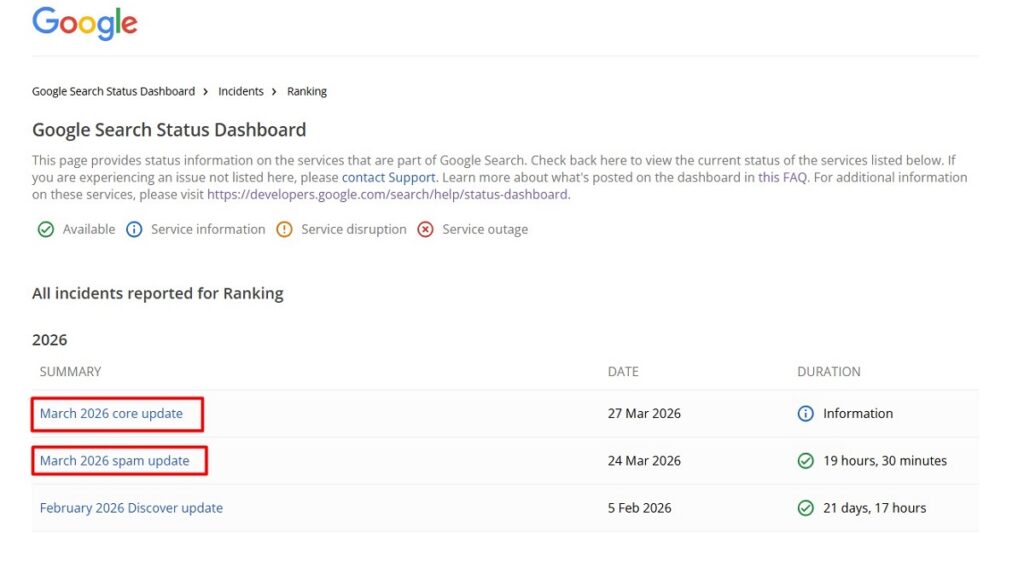
March 2026 was a brutal month for SEO. Google did not just release one update. They released two entirely different updates within a three day window.
First, Google Search Central announced a spam update on March 24. This rollout was incredibly fast. It finished in under 20 hours. In fact, it is the shortest confirmed spam rollout in the history of the Google Search Status Dashboard.
Then, on March 27, they launched the March 2026 Core Update. This was the first broad core update of the year.
The rapid spam update acted like a quick SpamBrain penalty to catch active rule breakers. The core update was a broader recalibration of how Google measures content quality, relevance, and trust.
How to Diagnose Your Traffic Drop: Spam vs. Core Update
Before you change a single word on your site, you need a proper traffic drop diagnosis. The fix for a spam penalty is very different from a core update recovery. You must look closely at the timeline of your rankings fluctuation.
Here is how to figure out which update hit you:
- Open Google Search Console.
- Go to Performance, then Search Results.
- Set the date range to March 23 through April 5.
- Check for a massive, steep drop specifically on March 24 or 25.
- Check for a slow, gradual decline starting around March 27.
If your traffic vanished overnight on March 24, the spam update caught you. If the drop started on March 27 and worsened over the next two weeks, you are dealing with the core update.
| Metric | March 2026 Spam Update | March 2026 Core Update |
| Launch Date | March 24, 2026 | March 27, 2026 |
| Target | Active policy violations and web spam. | Overall content quality, unique value, and authority. |
| Impact Speed | Immediate overnight drop. Finished in 20 hours. | Gradual decline over two weeks. |
| Required Fix | Remove toxic links and delete mass-produced garbage. | Improve Information Gain and prove human expertise. |
Your Action Plan for the March 2026 Spam Update
The spam update was highly aggressive. Google targeted sites using manipulative tactics like expired domain abuse, link spam, and scaled content abuse. If you lost traffic here, Google systems believe your site actively breaks their rules.
Spam update recovery takes serious cleanup. First, check your Google Search Console for a manual action notice. Even if you do not see a manual warning, you need to audit your site for automated penalties.
- Review automated content. If you published hundreds of unedited AI articles, you need to pull them down. Google is getting much better at detecting scaled content abuse.
- Audit your backlinks. Look for toxic or purchased links. If you bought cheap links in bulk, disavow them immediately.
- Delete thin content. Find pages created just to target exact match keywords. If they offer zero value to a reader, delete or redirect them.

Surviving the Core Update: The New Focus on Information Gain
The core update is a massive shift. The biggest takeaway from the March 2026 rollout is that Google is heavily enforcing Information Gain SEO. This means your content must add genuinely new ideas to the internet.
Rewording the top three search results will no longer work. If your page says the exact same thing as your competitors, Google will drop your ranking. You must provide unique value. Add original data, real case studies, or a unique perspective.
Google also cracked down hard on “parasitic SEO.” A strong domain reputation no longer protects every individual page on that domain. Weak pages hosted on authority sites are now being evaluated independently. Quality matters at the page level.
You must also rethink how you use AI generated content. Using AI to brainstorm or outline is fine. Publishing raw AI text without human expertise will tank your site. To satisfy the EEAT content guidelines, you need real authors with verifiable credentials and real world experience.
Rebuilding Your Technical Foundation
You cannot outrank competitors with a broken website. The core update looks very closely at your site architecture.
A slow site creates a frustrating user experience. Google will not reward a bad experience. You must fix your technical baseline before focusing on content.
- Test Core Web Vitals. Run your pages through PageSpeed Insights. Your LCP (Largest Contentful Paint) must be under 2.5 seconds.
- Fix visual stability. Stop elements from shifting around as the page loads.
- Clean up code. Defer unnecessary JavaScript and remove heavy third party scripts.
- Check mobile styling. Ensure the site is perfectly readable and clickable on mobile phones.
How to Tell Which One Hit You
It is easy to find out which update caused your traffic to drop. You just need to look at the calendar.
| Did you lose visitors on… | Which Update Was It? | What does it mean? |
| March 24 or 25 | The Spam Update | Google thinks your site broke their rules. |
| March 27 or later | The Core Update | Google thinks other sites have better, newer info. |
What the Experts Say
Experts who study search engines noticed a clear pattern in who lost visitors and who kept them. One search expert explained the outcome like this:
“The sites built on a foundation of genuine expertise, original content, and clean technical performance don’t need to panic.”
What this means: If your website is fast, written by real people who actually know what they are talking about, and shares true ideas, you will be perfectly safe.
Simple Tips to Get Your Visitors Back
If your website lost its visitors, do not panic. You can fix it over time. Here are three simple things you can do:
- Share your own ideas. Do not just repeat what other websites say. Add your own thoughts, your own pictures, or real-life examples that nobody else has.
- Fix broken parts of your site. Make sure your website loads quickly. Nobody likes waiting for a slow website to open.
- Delete useless pages. If you have pages that do not help anyone or answer any real questions, get rid of them. Keep only your very best work.
Google just wants to show people good, honest websites. Focus on being helpful, and your visitors will eventually come back.
Frequently Asked Questions
How long does it take to recover from the March 2026 core update?
Recovery from a broad core update typically takes a few weeks to several months. You will need to wait for the next major rollout to see full recovery.
You must make significant improvements to your overall content quality. Google needs time to recrawl your site and measure the new Information Gain before restoring your rankings.
What is the difference between the March 2026 spam update and core update?
The spam update targeted sites actively breaking Google policies with manipulative tactics. The core update was a broader adjustment measuring overall content quality and unique value.
The spam update acted quickly to punish bad actors. The core update shifted the baseline for what makes a page helpful and authoritative.
Does Google penalize AI content in 2026?
Google does not ban AI content entirely. However, it actively penalizes mass-produced text that lacks human expertise, original insights, and verifiable editorial oversight.
If you use AI to scale production without adding real value, your site will suffer. You must inject personal experience into every post.
How do I know if my site was hit by a spam penalty?
Check your Search Console performance data. If your traffic dropped sharply on or exactly around March 24, you likely suffered a spam penalty.
You should also check the manual actions tab. Google will often list specific violations there. If you see a warning, you must fix the issue and submit a reconsideration request.
What is Information Gain in SEO?
Information Gain measures how much new, unique value a webpage adds to a specific topic compared to existing search results.
It rewards original data, unique case studies, and fresh perspectives. Google uses this to stop ranking sites that just repeat previously published information.